Technical Documents
Specifications
Brand
StarTech.comProduct Type
KVM Switch
Video Connection Type
DVI
Number of Ports
2
Supported Number of Displays
2
Number of Video Outputs
2
Maximum Resolution
1920 x 1200 pixel
Keyboard/Mouse Connection Type
USB
Audio Connection Type
3.5 mm Stereo
Height
57mm
Depth
100mm
Standards/Approvals
FC, TAA.RoHS, CE
Width
163mm
Keyboard Layout
104 Key
Country of Origin
Taiwan, Province Of China
Product Details
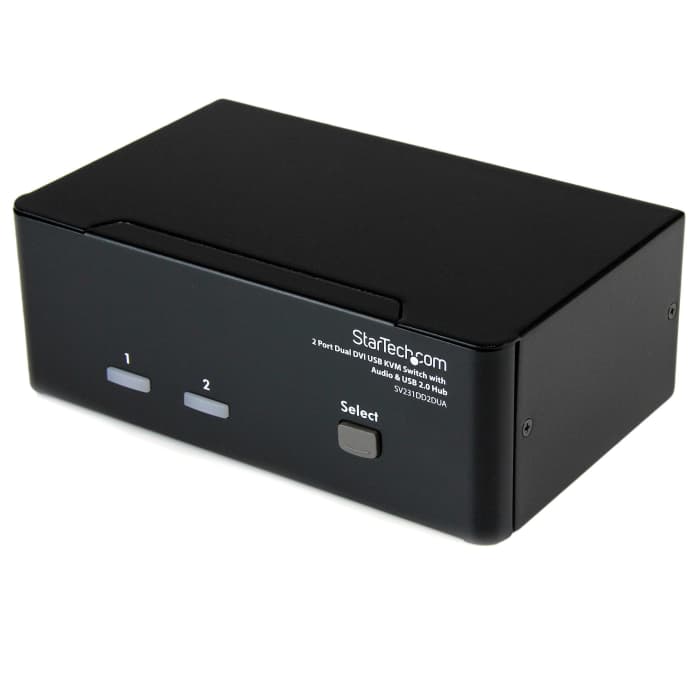
The SV231DD2DUA 2-port Dual DVI USB KVM Switch allows two PCs, each with dual DVI video outputs, to share two monitors, one microphone and set of speakers, one keyboard and one mouse as well as two other USB peripherals.
An ideal solution for graphic designers, CAD/CAM designers or educational and financial institutions, the dual view KVM Switch allows you to instantly switch back and forth between dual DVI display PCs at the touch of a button, while maintaining professional level video quality on both monitors. The dual DVI switch also features an integrated USB hub port that allows USB 2.0 peripherals such as thumb drives, external hard drives or web cams to be shared between attached systems - eliminating duplicate peripheral costs.
Please Note: This KVM switch supports DVI-D (digital) signaling only and it is recommended wherever possible to use DVI-D cabling across all PC to KVM and KVM to Console connections to ensure proper function. Please contact technical support if you require assistance identifying the proper cables.
This product is backed by a Startech.com 3 year warranty with free lifetime technical support.
Can I use any mouse or keyboard with the KVM Switch?
It will depend on the type of mouse or keyboard used. It is advised by the manufacturers to use standard wired 104 key keyboards and a standard wired mouse that does not have additional features. This includes wireless, gaming and Apple keyboards.
This KVM switch supports DVI-D (digital) signaling only and it is recommended wherever possible to use DVI-D cabling across all PC to KVM and KVM to Console connections to ensure proper function
Stock information temporarily unavailable.
€ 342.14
€ 342.14 Each (ex VAT)
1
€ 342.14
€ 342.14 Each (ex VAT)
Stock information temporarily unavailable.
1
Technical Documents
Specifications
Brand
StarTech.comProduct Type
KVM Switch
Video Connection Type
DVI
Number of Ports
2
Supported Number of Displays
2
Number of Video Outputs
2
Maximum Resolution
1920 x 1200 pixel
Keyboard/Mouse Connection Type
USB
Audio Connection Type
3.5 mm Stereo
Height
57mm
Depth
100mm
Standards/Approvals
FC, TAA.RoHS, CE
Width
163mm
Keyboard Layout
104 Key
Country of Origin
Taiwan, Province Of China
Product Details
The SV231DD2DUA 2-port Dual DVI USB KVM Switch allows two PCs, each with dual DVI video outputs, to share two monitors, one microphone and set of speakers, one keyboard and one mouse as well as two other USB peripherals.
An ideal solution for graphic designers, CAD/CAM designers or educational and financial institutions, the dual view KVM Switch allows you to instantly switch back and forth between dual DVI display PCs at the touch of a button, while maintaining professional level video quality on both monitors. The dual DVI switch also features an integrated USB hub port that allows USB 2.0 peripherals such as thumb drives, external hard drives or web cams to be shared between attached systems - eliminating duplicate peripheral costs.
Please Note: This KVM switch supports DVI-D (digital) signaling only and it is recommended wherever possible to use DVI-D cabling across all PC to KVM and KVM to Console connections to ensure proper function. Please contact technical support if you require assistance identifying the proper cables.
This product is backed by a Startech.com 3 year warranty with free lifetime technical support.
Can I use any mouse or keyboard with the KVM Switch?
It will depend on the type of mouse or keyboard used. It is advised by the manufacturers to use standard wired 104 key keyboards and a standard wired mouse that does not have additional features. This includes wireless, gaming and Apple keyboards.
This KVM switch supports DVI-D (digital) signaling only and it is recommended wherever possible to use DVI-D cabling across all PC to KVM and KVM to Console connections to ensure proper function